
Download Click Clean – Free Browser History Cleaner for Secure, Private Browsing
Overview
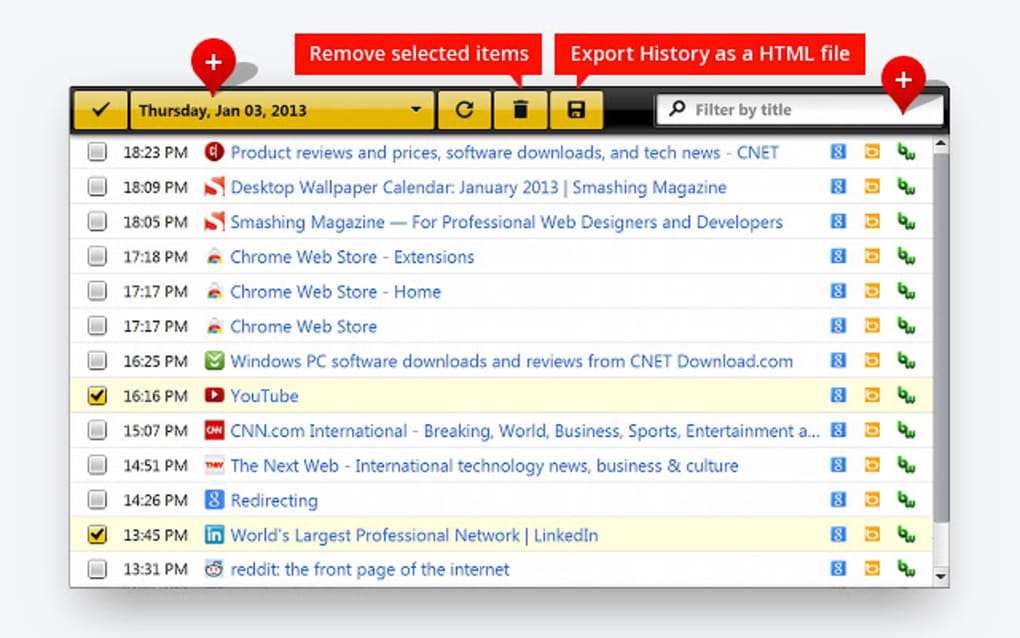
Click Clean is a lightweight, free browser add‑on designed to give you control over the digital footprints you leave behind while surfing the web. In today’s hyper‑connected environment, every visited page, cached image, and lingering cookie can be harvested by advertisers, trackers, or even malicious actors. Click Clean tackles this privacy challenge head‑on by providing a one‑click solution that erases typed URLs, cache files, cookies, download history, and even Flash‑based storage.
The tool works with the built‑in cleaning capabilities of modern browsers and augments them with smart algorithms that reach deeper into hidden data stores without forcing you to close the browser. Whether you need a quick manual purge after a sensitive session or prefer an automatic wipe each time you exit, Click Clean offers flexible options that fit both casual users and privacy‑conscious professionals. In addition to privacy‑focused cleaning, the add‑on bundles a browser‑update scanner, temporary‑file remover, and even a lightweight malware check, turning it into a multi‑purpose maintenance suite.
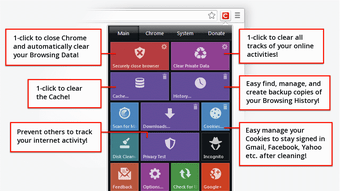
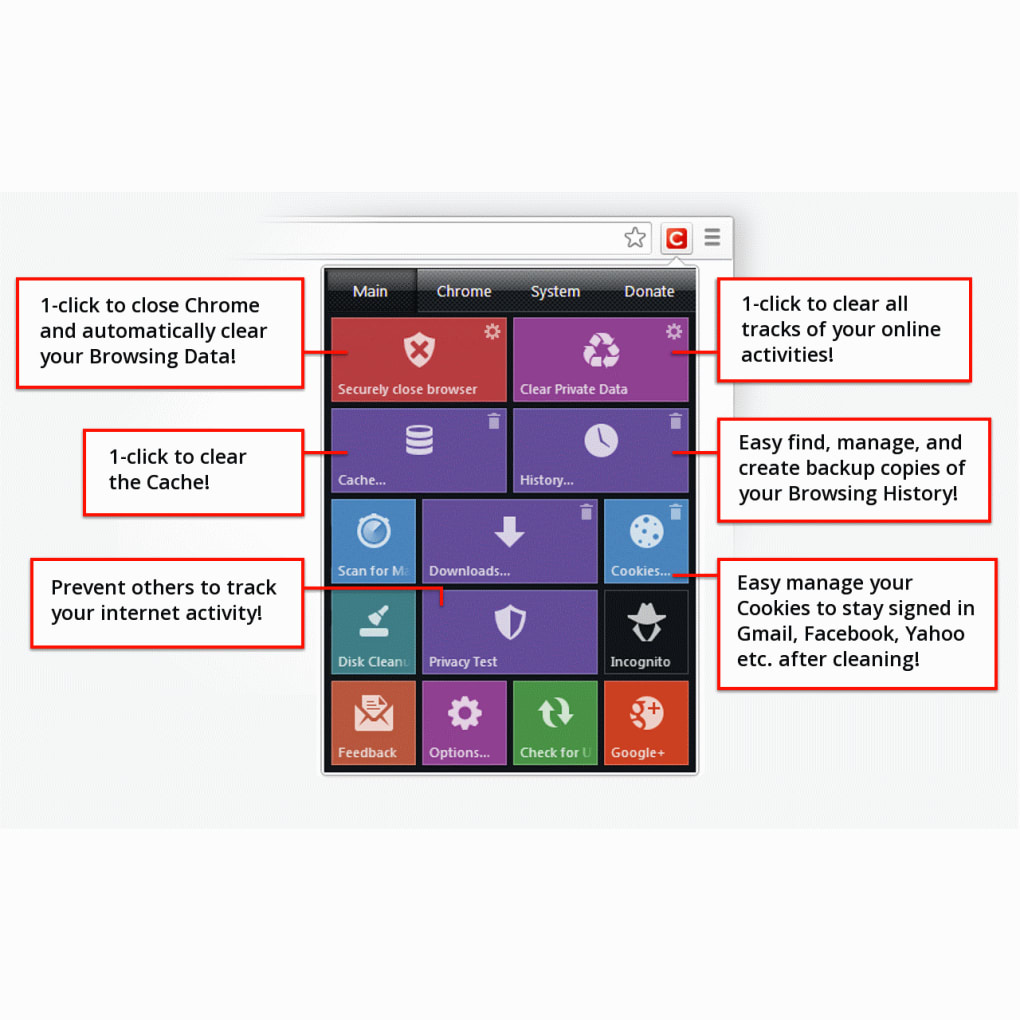
Its intuitive icon sits beside the address bar, allowing you to clear private data with a single click, making it an indispensable companion for anyone who values speed, security, and peace of mind while browsing.
Key Features
- One‑Click Private Data Erasure: Instantly clears browsing history, typed URLs, cache, cookies, and download records.
- Automatic Session Cleanup: Option to auto‑purge selected data types every time the browser is closed.
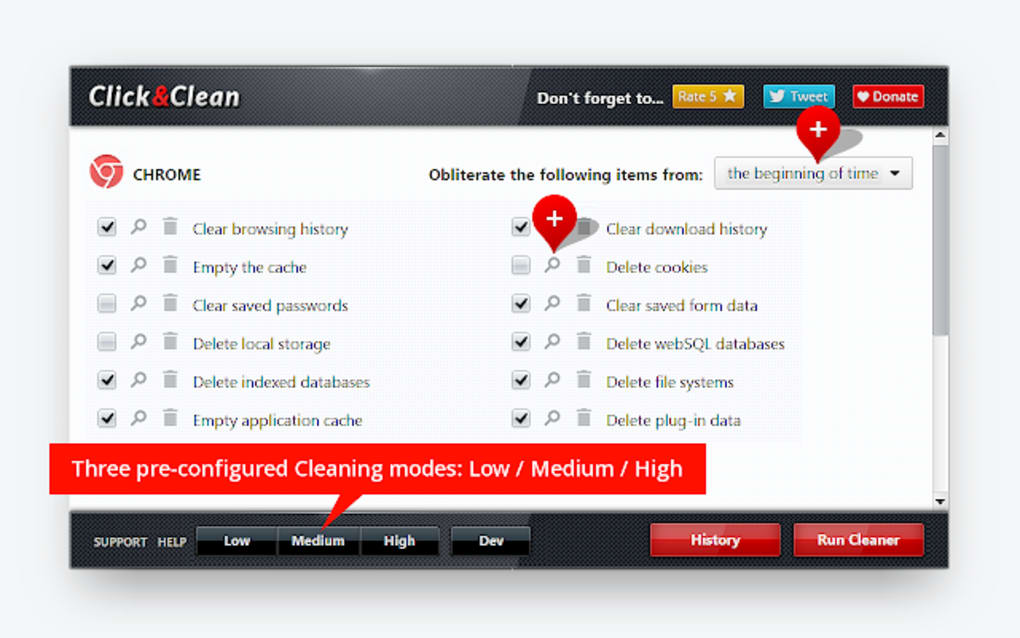
- Deep Cleaning Engine: Removes Flash cookies, client‑side Web SQL databases, and other hidden storage mechanisms that standard cleaners often miss.
- Built‑In Browser Update Scanner: Detects outdated extensions and prompts you to update, reducing vulnerability to known exploits.
- Lightweight Malware Scan: Performs a quick scan for common browser‑based malware and suspicious scripts.
- Disk Space Recovery: Deletes temporary files and residual data, freeing up hard‑drive space without affecting essential system files.
- Customizable Cleaning Profiles: Create and save multiple cleaning presets for different privacy scenarios (e.g., work, personal, public computer).
- Cross‑Browser Compatibility: Available for Google Chrome, Mozilla Firefox, Microsoft Edge, and Opera, ensuring a consistent experience across platforms.
- Secure, No‑Telemetry Design: Click Clean processes all data locally; no personal information is sent to external servers.
These features combine to make Click Clean a comprehensive privacy‑maintenance tool that does more than just clear your history. By targeting hidden storage locations and providing automatic cleanup options, the add‑on helps you maintain a lean browser profile, improve loading speeds, and safeguard sensitive information from prying eyes. The inclusion of a browser‑update scanner also adds an extra layer of defense, ensuring that your extensions stay current and less vulnerable to exploits. Overall, Click Clean balances simplicity with depth, delivering a user‑friendly interface without compromising on thoroughness.
Installation & Usage Instructions
Step‑by‑Step Installation
- Open your preferred browser (Chrome, Firefox, Edge, or Opera) and navigate to the official extension store.
- Search for “Click Clean” and verify that the publisher is the original developer to avoid counterfeit versions.
- Click the Add to Browser (or Install) button. A permission dialog will appear, outlining the data the add‑on needs to access (history, cache, cookies, etc.).
- Accept the permissions and wait a few seconds while the extension downloads and installs.
- Once installed, you’ll see the Click Clean icon—usually a small broom—placed next to the address bar. Click the icon to open the main dashboard.
How to Use Click Clean Effectively
After installation, using Click Clean is intentionally straightforward. Clicking the broom icon reveals a small popup with two primary actions: Clear Private Data and Settings. Selecting “Clear Private Data” instantly wipes all tracked items based on your current profile. For more granular control, go to Settings where you can toggle individual data types (e.g., only clear cookies but keep history) and enable the “Auto‑Clean on Exit” option. If you enable auto‑clean, you can specify a timer (immediate, 5 seconds, or custom) that triggers after the browser closes, ensuring no residual traces remain.
Advanced users may appreciate the “Custom Profiles” feature. From Settings, click “Create New Profile,” name it (e.g., “Public Computer”), and select the exact data categories you wish to purge. Switch between profiles with a dropdown in the main popup, allowing you to adapt cleaning behavior to different environments without reconfiguring each time.
In addition to privacy cleaning, the sidebar includes quick links to the “Browser Update Scanner” and “Malware Scan.” Running these utilities periodically helps keep your extensions up‑to‑date and your browsing environment free from common threats. The entire suite operates locally, meaning your data never leaves your machine, which aligns with the tool’s privacy‑first philosophy.
Compatibility, Pros & Cons
Click Clean is compatible with the 64‑bit versions of the major desktop browsers on Windows 10/11, macOS 10.15 and later, as well as Linux distributions that support Chrome‑based browsers. The extension is not available for mobile browsers (Android or iOS) due to platform restrictions on third‑party add‑ons.
Pros
- Instant one‑click cleaning saves time.
- Deep cleaning reaches hidden storage like Flash cookies and Web SQL databases.
- Automatic cleanup on browser exit provides hands‑free privacy.
- Built‑in browser‑update scanner helps maintain extension security.
- Lightweight and runs without noticeable lag on modern systems.
- Free with no hidden fees or subscription model.
Cons
- Requires a 64‑bit architecture; not supported on older 32‑bit systems.
- Automatic cleaning can occasionally interfere with session‑based web apps that rely on cookies.
- Limited to desktop browsers; no mobile app or extension.
- Advanced cleaning options may be overwhelming for beginners.
- Occasional false‑positive malware alerts that need manual verification.
Frequently Asked Questions
Is Click Clean really free?
Yes, Click Clean is completely free to download and use. There are no hidden subscription fees or premium tiers; all features are available to every user.
Will Click Clean slow down my browser?
The cleaning process itself runs quickly and is designed to operate without closing the browser. However, enabling automatic cleanup on every exit may add a few seconds to the shutdown time, especially if you have a large amount of cached data.
Can I use Click Clean on a Mac?
Yes, Click Clean works with the macOS versions of Chrome, Firefox, Edge, and Opera as long as the system runs a 64‑bit architecture (macOS 10.15 Catalina or newer).
Does Click Clean collect any personal data?
No. All cleaning operations are performed locally on your computer. The extension does not send browsing data, cookies, or any personal information to external servers.
How often should I run the malware scanner?
Running the built‑in malware scan once a week is sufficient for most users. If you frequently install new extensions or visit unfamiliar sites, consider scanning after each major browsing session.
Final Verdict & Call to Action
Click Clean delivers exactly what its name promises: a fast, reliable, and free way to erase your online footprints with a single click. Its blend of deep‑cleaning capabilities, automatic session cleanup, and auxiliary tools such as the browser‑update scanner make it stand out among free privacy extensions. While it does require a modern 64‑bit system and may add a slight delay during shutdown, these trade‑offs are minor compared to the peace of mind gained from knowing that cookies, caches, and hidden data are routinely purged. For anyone who values privacy, wants to keep their browser lean, or simply wishes to free up disk space without manual tinkering, Click Clean is a worthy addition to your browser toolkit.
Ready to protect your browsing history? Download Click Clean now and start browsing with confidence—free, secure, and completely under your control.







